# 플레이스토어 앱 자동업데이트 설정하기

안드로이드폰에서 내가 사용하고 있는 **앱들이 최신버전으로 업데이트 될 경우 ‘자동업데이트’를 설정해놓으면 알아서 최신버전으로 업데이트 됩니다.**

**혹은 데이터가 걱정이 된다면, 와이파이 상태에서만 자동업데이트가 되도록 설정할 수 있구요.**

**자동업데이트가 싫다면, 업데이트를 하지 않음으로 설정할 수도 있어요.**

&#x20;**(그럼 업데이트가 안되겠지만요 ㅠㅠ)**

스윙투앱 이용자분들 역시 플레이스토어에 앱을 출시하셔서 이용중이라면,

**플레이스토어 앱 > ‘설정’ 에서> ‘앱 자동 업데이트’**&#xB97C; 선택해서 사용하시길 권장드립니다.

***

### <mark style="color:blue;">**플레이스토어 자동 업데이트 설정 방법**</mark>

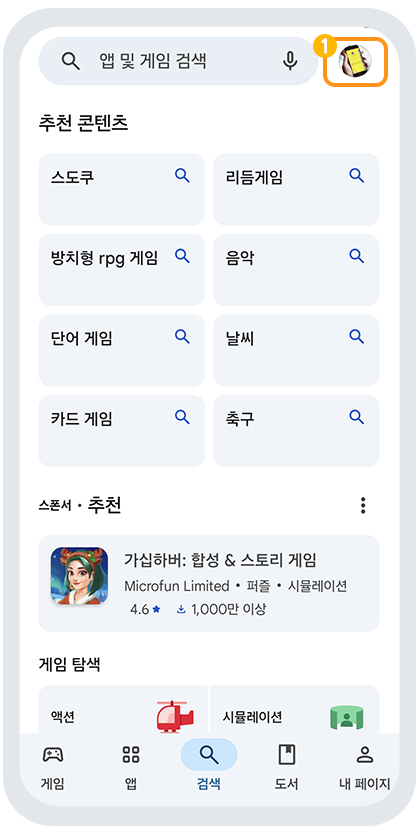
1.구글 플레이스토어 앱을 실행해주세요.

&#x20;화면의 <mark style="color:blue;">**오른쪽 상단 프로필 버튼**</mark>을 눌러주세요.

<div align="left"><figure><img src="https://684031119-files.gitbook.io/~/files/v0/b/gitbook-x-prod.appspot.com/o/spaces%2FmsJj00k8mj8AcVpnn9Xs%2Fuploads%2FSLItBXmVooHaW3ALUaNF%2Fu1.png?alt=media&#x26;token=b2157e0a-8dc7-469f-9548-1aaccb23bd4e" alt=""><figcaption></figcaption></figure></div>

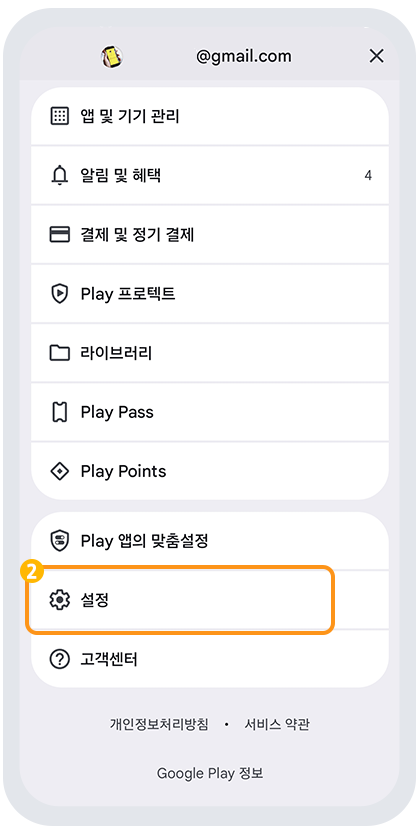
그럼 아래처럼 ↓↓  메뉴창이 뜹니다.

2\. 메뉴 화면에서 **\[설정]**&#xC744; 탭합니다.&#x20;

<div align="left"><figure><img src="https://684031119-files.gitbook.io/~/files/v0/b/gitbook-x-prod.appspot.com/o/spaces%2FmsJj00k8mj8AcVpnn9Xs%2Fuploads%2FVa1bzSTD6h3Wgg1CHygW%2Fu2.png?alt=media&#x26;token=2dd5df40-dbf4-427c-bf11-7d6dd356390c" alt=""><figcaption></figcaption></figure></div>

&#x20;

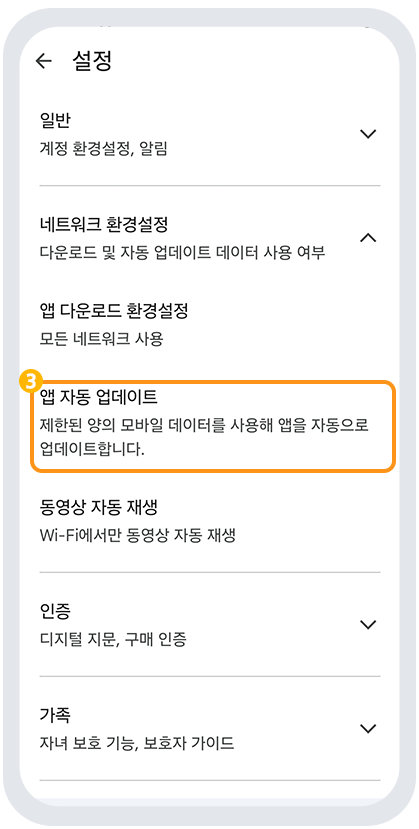
3\. 설정 창에서 \[**앱 자동 업데이트]**&#xB97C; 선택해주세요.&#x20;

<div align="left"><figure><img src="https://684031119-files.gitbook.io/~/files/v0/b/gitbook-x-prod.appspot.com/o/spaces%2FmsJj00k8mj8AcVpnn9Xs%2Fuploads%2F0nNlEQgz5rFzu5Dyy2Bv%2Fu3.png?alt=media&#x26;token=5295c608-088d-48ea-a13c-34e5d8d67ae5" alt=""><figcaption></figcaption></figure></div>

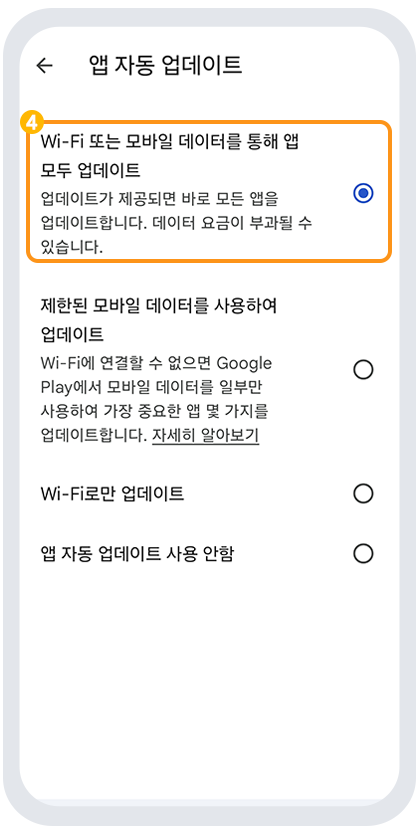
4\. **앱 자동 업데이트 선택 체크**&#x20;

<div align="left"><figure><img src="https://684031119-files.gitbook.io/~/files/v0/b/gitbook-x-prod.appspot.com/o/spaces%2FmsJj00k8mj8AcVpnn9Xs%2Fuploads%2F6ItWUUZHDP6GK9pmxdla%2Fu4.png?alt=media&#x26;token=a270ba60-09ce-4956-8220-0da4cc3d49e5" alt=""><figcaption></figcaption></figure></div>

&#x20;<mark style="color:blue;">**‘ Wi-Fi 또는 모바일 데이터를 통해 앱 모두 업데이트'**</mark> 로 체크

or&#x20;

데이터가 부담될 경우 <mark style="color:blue;">**‘한된 모바일 데이터를  사용하여 업데이트'**</mark>선택해주시면 됩니다.

**안드로이드폰을 이용하고 계신다면, 플레이스토어 앱에 접속하여 자동업데이트를 설정해주세요.**

**이렇게 플레이스토어에서 자동 업데이트를 선택해놓으면, 일일이 스토어로 이동하여 업데이트를 하지 않아도 되구요.**

**업데이트 건이 있으면 알아서 업데이트가 됩니다.**&#x20;

**혹은 자동업데이트를 사용하지 않을 때에도 해당 방법을 이용해주시면 됩니다. (앱 자동 업데이트 사용 안함)**

---

# Agent Instructions: Querying This Documentation

If you need additional information that is not directly available in this page, you can query the documentation dynamically by asking a question.

Perform an HTTP GET request on the current page URL with the `ask` query parameter:

```
GET https://documentation.swing2app.co.kr/knowledgebase/playstore/manage/automatic-update.md?ask=<question>
```

The question should be specific, self-contained, and written in natural language.
The response will contain a direct answer to the question and relevant excerpts and sources from the documentation.

Use this mechanism when the answer is not explicitly present in the current page, you need clarification or additional context, or you want to retrieve related documentation sections.