> For the complete documentation index, see [llms.txt](https://documentation.swing2app.co.kr/llms.txt). Markdown versions of documentation pages are available by appending `.md` to page URLs; this page is available as [Markdown](https://documentation.swing2app.co.kr/knowledgebase/appstore/appstore-installcount.md).
# 앱스토어 앱 설치수 확인하기
**앱스토어에 출시된 앱 다운로드수(판매량) 확인하는 방법**
애플 개발자 계정이 있는 경우는 앱스토어 커넥트 사이트에 접속해서 사용자들이 우리 앱을 얼마나 다운 받았는지 앱 설치수 통계를 확인할 수 있습니다
해당 매뉴얼을 통해서 애플-앱스토어에서 앱 설치수를 확인하는 방법을 알려드리겠습니다.
\*앱스토어를 스윙투앱 계정으로 대리등록한 분들은 확인할 수 없습니다.
사용자의 애플 개발자 계정으로 등록한 분들만 확인 가능해요!
\*구글 플레이스토어 앱 설치수 확인은 아래 매뉴얼을 확인해주시기 바랍니다.
**☞** [**플레이스토어 앱설치수 확인방법 매뉴얼**](https://documentation.swing2app.co.kr/knowledgebase/playstore/manage/playstore-installcount)
{% embed url="" %}
***
## **1. 앱스토어 커넥트 사이트 접속**
[https://appstoreconnect.apple.com](https://appstoreconnect.apple.com/) 앱스토어 커넥트 접속
{% embed url="" %}
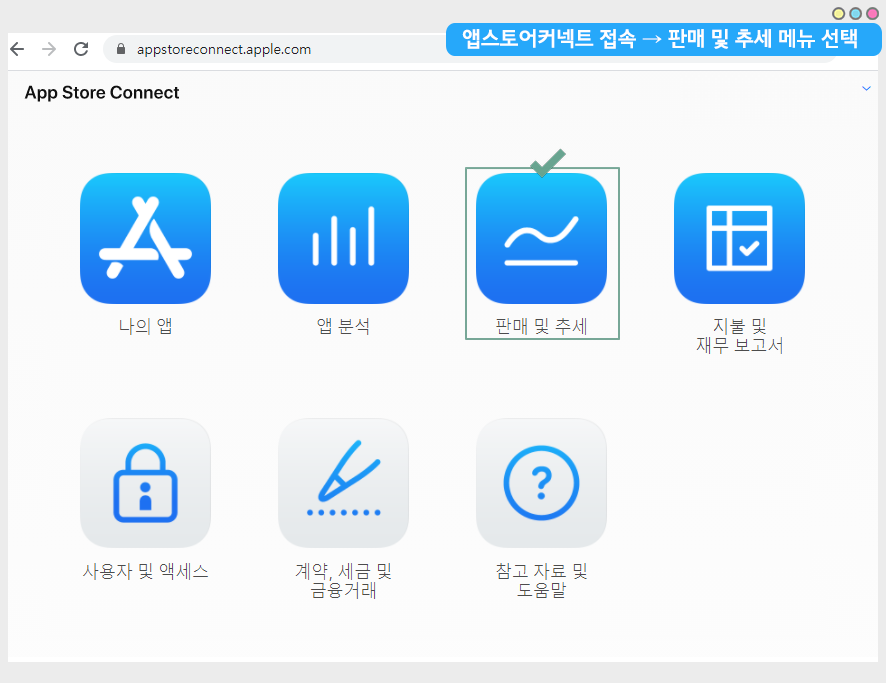
+해당 사이트로 접속하여, 애플 개발자 계정으로 로그인해주세요.
+메인 대시보드 페이지에서 **\[판매 및 추세]** 메뉴를 선택해주세요.
{% hint style="success" %} **추가 안내**
1\)애플 개발자 계정은 [ apple developer 사이트](https://developer.apple.com/)에서 만들 수 있어요.
2\)개발자 등록 방법은 스윙 포스팅 내용을 참고해주세요 ☞[**\[애플 개발자 계정 등록방법 보러가기\]**](/knowledgebase/appstore/apple-developer.md)
3\)등록비는 129,000원 (1년마다 갱신해야 해요)이구요.
4\)계정이 있으면 갯수 제한 없이 앱스토어에 앱을 출시하여 사용할 수 있어요.
{% endhint %}
***
## **2.개요**
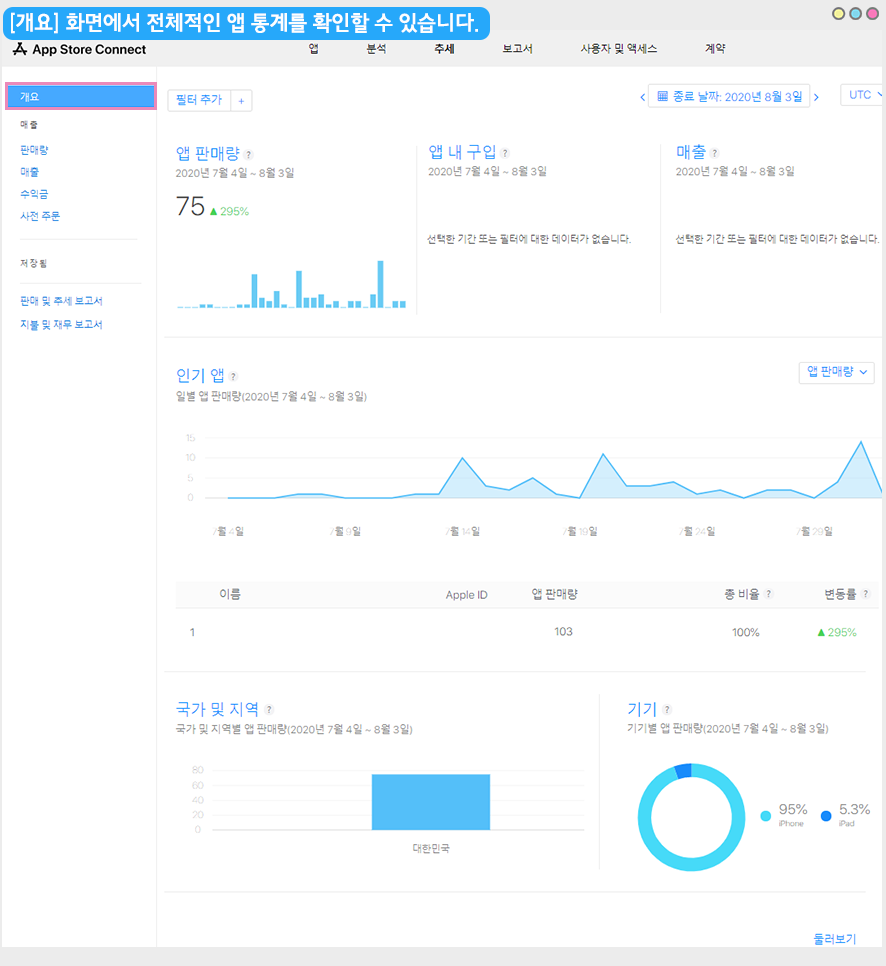
전체적인 앱 통계 개요를 확인할 수 있는 페이지에요.
따로 보고서나 통계 파일이 필요하지 않고, 전체적으로만 확인하실 경우 간편하게 개요 페이지에서 확인할 수 있습니다.
상세 앱 설치수를 확인하려면 아래 방법을 확인해주세요.
***
## **3. 판매량**
앱스토어는 앱 **‘다운로드수’ = ‘판매량’**으로 표시해요. 같은 의미로 쓰이니 동일하게 봐주세요 ^^
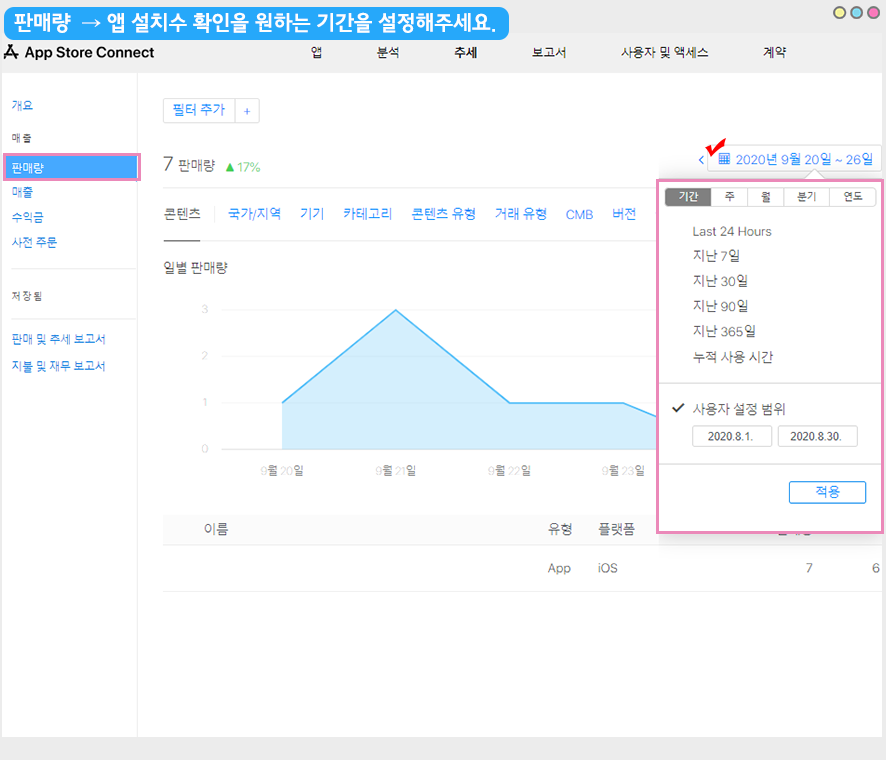
**왼쪽 카테고리에서 \[판매량]을 선택해주세요.**
판매량 페이지가 앱 설치수를 상세한 지표로 확인할 수 있습니다.
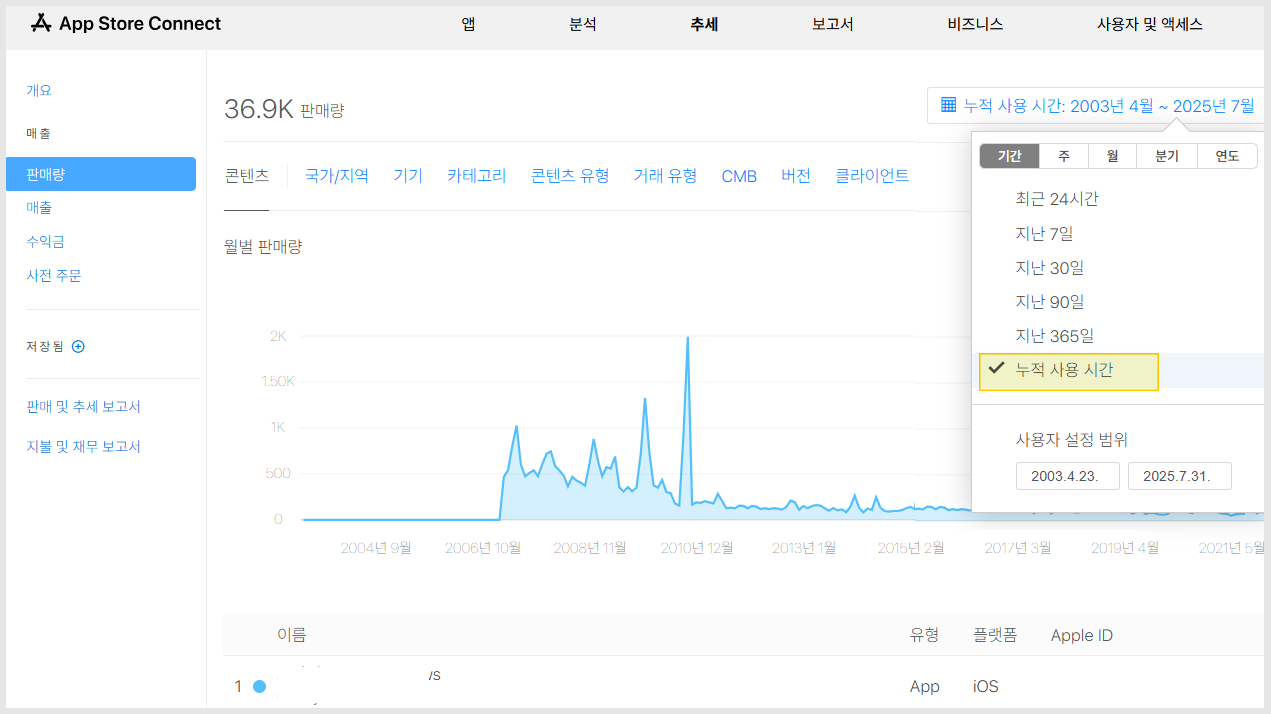
오른쪽 상단에 보시면 기간 및 날짜를 선택할 수 있어요.
기간을 설정하면, 설정한 기간 내에 설치된 앱 수를 확인할 수 있어요.
### **1)누적 사용기간 설치 수 확인**
\*앱을 출시하고 현재까지의 모든 설치수를 확인하기를 원할 경우 ‘누적 사용시간’을 선택해주시면 됩니다.
***
## **4. 앱 설치수 통계 다운로드**
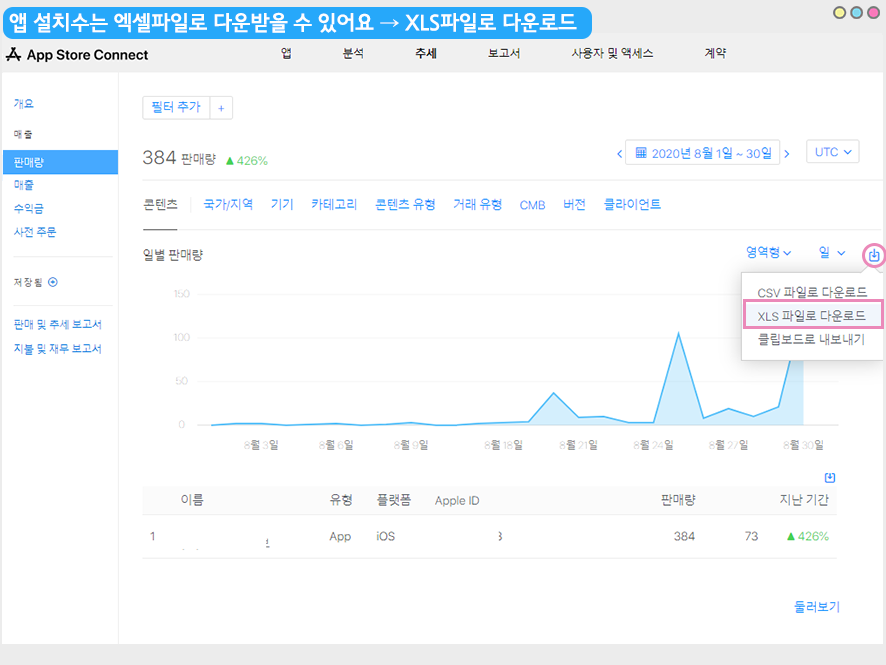
**앱 설치수는 엑셀파일로 내려받을 수 있어요.**
기간 설정 밑에 다운로드 아이콘 버튼이 있구요.
해당 버튼 선택하신 뒤 →**\[XLS 파일로 다운로드]**를 선택하면 엑셀파일로 확인할 수 있습니다.
csv파일을 선택하셔도 괜찮습니다.
**앱 판매량 통계 엑셀파일**

엑셀파일을 열면 이렇게 해당 기간동안의 앱 설치수(판매량)을 확인할 수 있습니다.
**앱스토어 판매량에서는 다양한 콘텐츠 유형별로 앱 설치수를 확인할 수 있어요.**
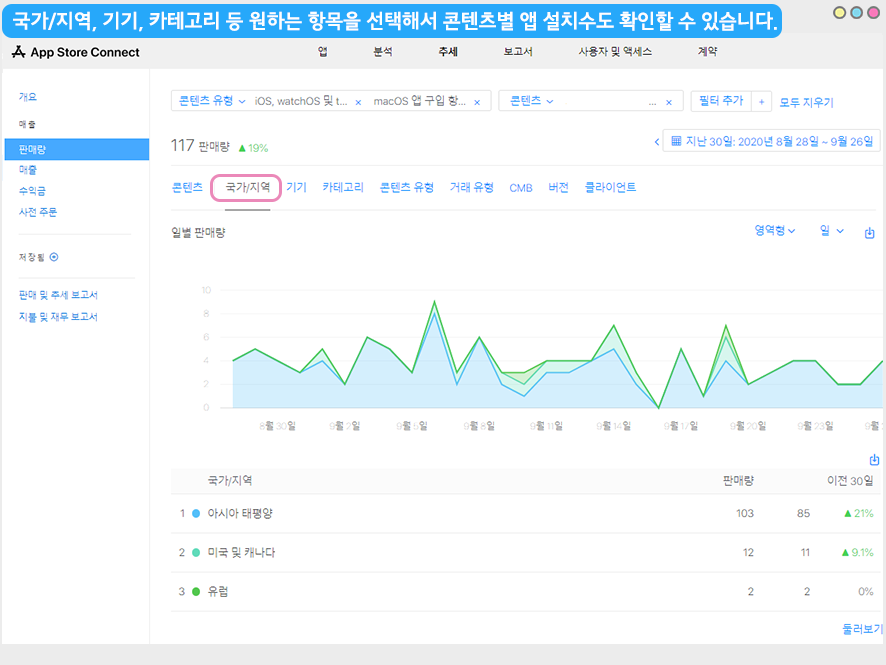
국가 /지역을 선택하면 각 나라마다 설치된 앱 판매량 수를 확인할 수 있구요.
그외 다양한 컨테츠별로 앱 설치수 확인이 가능합니다.
***
{% hint style="warning" %}
**만약 애플 개발자 계정에 여러 앱이 출시되어 있다면 원하는 앱만 어떻게 선택해서 확인하나요?**
{% endhint %}

이렇게 여러 앱 중에서 특정 앱의 판매량을 확인하고 싶다면, **목록에서 해당 앱을 선택하시면 되구요.**
**선택한 앱만 필터링되어 해당 앱의 판매량을 확인할 수 있습니다.**
{% hint style="danger" %} **★ 안내사항**
1\. 사용자분의 애플 개발자계정이 있으실 경우만, 앱스토어 커넥트에 접속하여 앱 판매량 통계를 확인할 수 있어요.
2\. 스윙투앱 개발자 계정으로 대리 등록한 경우 앱 다운로드 통계는 제공하지 않습니다.
스윙투앱 계정으로 대리 등록한 사용자분들은 앱스토어 앱 설치수, 통계, 앱스토어 관련 정보를 확인할 수 없습니다.
{% endhint %}
 **앱 판매량 통계 엑셀파일**

엑셀파일을 열면 이렇게 해당 기간동안의 앱 설치수(판매량)을 확인할 수 있습니다.
**앱 판매량 통계 엑셀파일**

엑셀파일을 열면 이렇게 해당 기간동안의 앱 설치수(판매량)을 확인할 수 있습니다.